
CRM
Keep the thread of every relationship
A small business CRM that remembers for you. Contacts, conversations and next steps live in one record, and you answer mail right beside the customer it came from.


Contacts and companies
Who someone is, how you met, and what happened since.
Each person and their company share one record, with a timeline of everything that happened: the enquiry from your website, the note you jotted down, the mail that came in or went out, the task you finished.
Notes stay with the record, so whoever picks up the thread next knows exactly where things stand.
We switch CRM on for your account together with you. Connected mail needs a mailbox and a sender set up first.

Your guide to customers
Deals and next steps
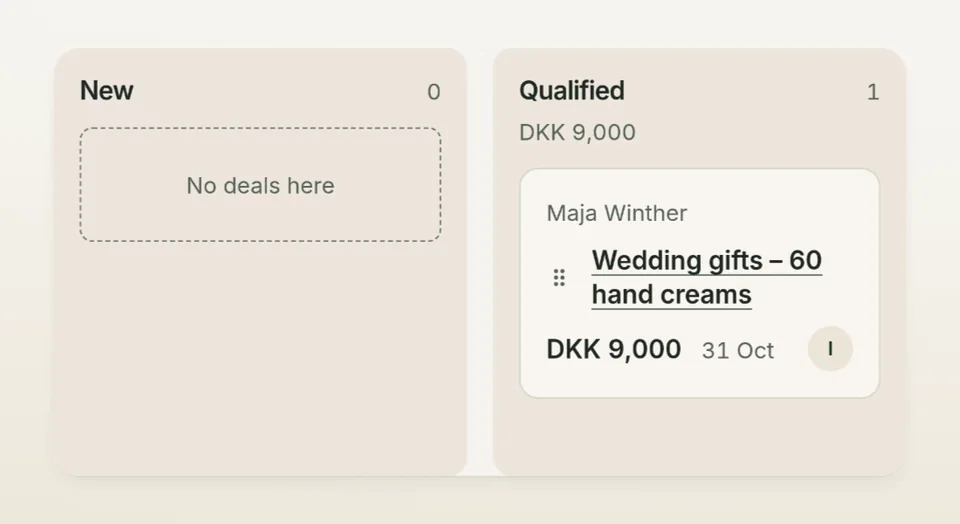
Watch each deal move across your pipeline board, stage by stage. Give every next step a task, a deadline and a name, so nothing is left hanging.
- Deals with stage, pipeline and owner
- Tasks with deadline and assignee
- Won or lost, with the reason kept
Your mail, right beside the customer
The conversation and the customer, side by side.
Connect a mailbox and the conversations appear beside the customer they belong to. Reply straight from the record. Your reply is queued to go out from your own mailbox, and you can see whether it is on its way or could not be sent.
Pro comes with one mailbox on your own domain and Business with three. Need more? Add them. You connect each mailbox yourself, and existing accounts are never linked automatically. See plans
From a website enquiry to the next step.
A visitor fills in your contact form. In Talelike you turn the enquiry into a contact, add a note and a follow-up task, and move the deal one stage on.
We switch CRM on for your account together with you. Connected mail needs a mailbox and a sender set up first.
Who can see what, and how to switch CRM on
CRM is switched on account by account. Ask us, and we will set it up with you. Inside the CRM, owners and editors create and change records, and viewers can read them.
Access simply follows each person’s account role. There are no separate sales roles and no permissions per record.
Bring your customer work together
Follow up by email, run your shop, or keep your pages fresh.
Let’s switch on your CRM
We switch CRM on for your account together with you. Connected mail needs a mailbox and a sender set up first.