CMS
Give your ideas a place to grow
Talelike is a visual CMS for the pages and articles you care about. Stack text and images into reusable sections, give every article an author, and find any image again in one library.


Create pages with reusable sections
Pages, sections and drafts: the everyday craft of a website.
Every page starts as a draft with a title and an address. Add a section, fill it with words and pictures, and move sections up or down until the page reads the way you hear it in your head. Nobody sees it until you publish.
- Add sections and fill them with your words and images
- Move sections until the order feels right
- Keep a page as a draft for as long as you like
The window here is a playable preview of where the editor’s design is heading. Have a go. Nothing is saved.

A Brighter Web
Ideas grow when we have space to explore them.


Your guide to pages and articles
Preview every page before you publish
Always know where a page stands, from first draft to live.
Talelike saves as you work, so you can undo, redo and change your mind freely. Then preview the page before anyone else sees it.
When you press Publish, Talelike saves anything still waiting and places the page in the publishing queue. The screen says so plainly, and the page goes live as soon as that run is done.
Find every page, article and image again
Bylines, categories and one tidy library.
Articles with a byline
Give every article an excerpt, a featured image with alt text, categories and a publication date. Link it to an author with their own details, so readers know whose voice they are hearing.
One library for every image
Search by filename or alt text, filter by category, and spot at a glance which images still need a description. Categories keep everything in order, without folders inside folders.
Give your page its shape.
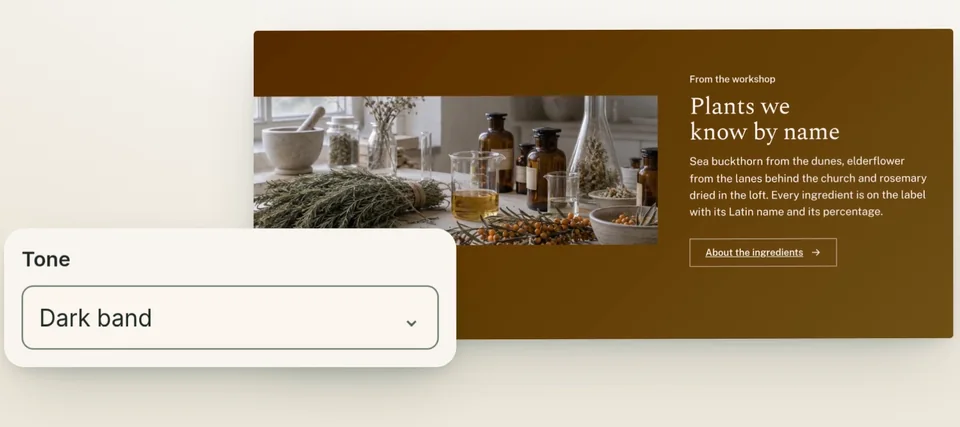
Change a heading right on the page, switch a section to a darker band, and see it all before you publish.
One small edit, one press of Publish, and the page is rebuilt with your changes.
A role for everyone on your team
Everyone on your account has their own sign-in and a role. Owners and editors shape the content. Viewers can look around without changing a thing. We set the team up with you.
Each person works on their own changes. Two people cannot edit the same page live at the same time. How teams work in Talelike
Choose your next page
Help people find your pages, stay in touch with your readers, or see what they visit.
Start with one page
The Free plan costs nothing and includes one website. Compare the plans whenever you want more room.